Cloud Execution
Several ways to run in the cloud are provided; see Running Environments for details. In addition, CloudCat is a service for running background scripts in the cloud — a FAAS platform that is still under development.
⚠ Please note ⚠, once uploaded to the cloud, the meaning of once in a scheduled-script expression changes: the time before once is replaced with its minimum value when running.
For example:
* * once * *=>0 0 * * *: runs once per day, becomes running at 00:00 every day* 1-23 once * *=>0 1 * * *: runs once between 1:00 and 23:00 every day, becomes running at 01:00 every day* 1,3,5 once * *=>0 1 * * *: runs once at 1:00, 3:00, or 5:00 every day, becomes running at 01:00 every day* */4 once * *=>0 0 * * *: runs once every 4 hours every day, becomes running at 00:00 every day* 1-23/4 once * *=>0 1 * * *: runs once every 4 hours between 1:00 and 23:00 every day, becomes running at 01:00 every day* 10 once * *=>0 10 * * *: runs once at 10:00 every day, becomes running at minute 00 of hour 10 every day* * * once *=>0 0 1 * *: runs once per month, becomes running at 00:00 on the 1st of every month
Additional CloudCat Description Values
A reference script: Bilibili Auto Check-in
cloudCat
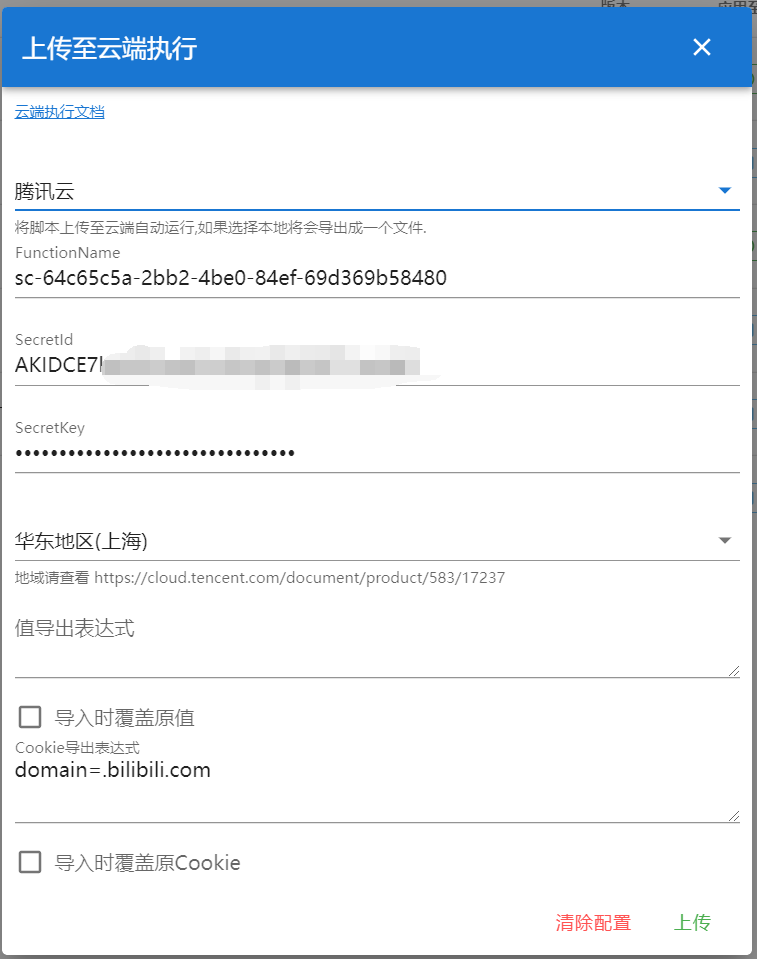
Declaring this attribute allows the script to run via CloudCat. Once a script has this option, a cloud-execution button appears in the script list; clicking it lets you choose an execution method — see Running Environments.

cloudServer
Related to cloudCat, not yet implemented
The default cloudCat server address
exportValue
Describes the Values to export to the cloud; multiple declarations are allowed.
// @exportValue key1,key2,key3
// @exportValue key4,key5,key6
exportCookie
Describes the cookies to export to the cloud; multiple declarations are allowed. Parameters are described using GM_cookie's CookieDetails, for example:
// The following exports the cookie named cookie1 from https://docs.scriptcat.org/docs/use/
// @exportCookie url=https://docs.scriptcat.org/docs/use;name=cookie1

// This exports all cookies for the scriptcat.org domain
// @exportCookie domain=scriptcat.org

// All available parameters:
// @exportCookie domain=scriptcat.org;url=https://docs.scriptcat.org/docs/use;name=cookie1;path=/docs/use;secure=true;session=true
API Support Changes
Currently only the following APIs are supported; unless otherwise noted, they behave the same as the original API.
GM_xmlhttpRequest
GM_notification
GM_log
GM_getValue
Currently only supports getting Values exported via @exportValue; set/delete/list and other methods are not supported.
Running Environments
Local
Exports a zip package; after extracting it into a folder, run the following commands to execute it locally (requires a local Node.js environment):
npm i
node index.js
Tencent Cloud
First create a Tencent Cloud key at Access Keys — if using a sub-account, make sure to grant it Cloud Function permissions. Then enable the service at Function Service, which comes with a certain amount of free usage each month. The region defaults to Shanghai; adjust it if needed. After clicking upload, a scheduled trigger is automatically created based on @crontab to run the function on schedule.