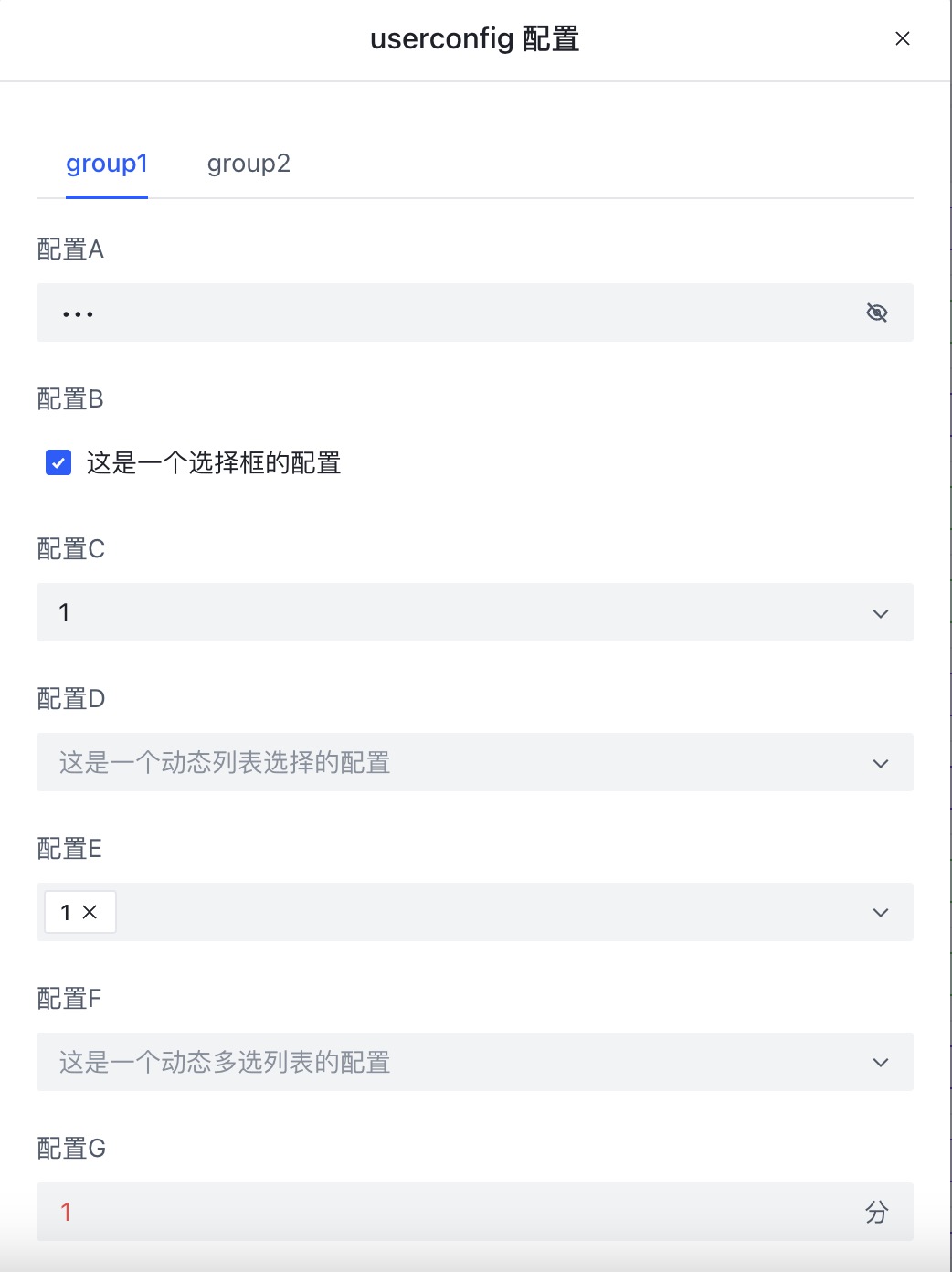
UserConfig
==UserConfig== 內的內容放在 ==UserScript== 之後,描述腳本的一些使用者可配置選項。配置以 YAML 格式編寫:
/* ==UserConfig==
group1:
  configA:                                # 鍵是 group.config,例如此鍵是 group1.configA
    title: Config A                       # 配置的標題
    description: 這是一個文字類型的配置      # 配置的描述
    type: text                            # 選項類型;如果省略則從數據自動檢測
    default: 預設值                        # 配置的預設值
    min: 2                                # 最少 2 個字元
    max: 18                               # 最多 18 個字元
    password: true                        # 標記為密碼欄位
  configB:
    title: Config B
    description: 這是一個核取方塊配置
    type: checkbox
    default: true
  configC:
    title: Config C
    description: 這是一個下拉選單配置
    type: select
    default: 1
    values: [1,2,3,4,5]
  configD:
    title: Config D
    description: 這是一個動態下拉選單配置
    type: select
    bind: $cookies                       # 動態綁定的值;鍵以 $ 開頭,值必須是陣列
  configE:
    title: Config E
    description: 這是一個多選下拉選單配置
    type: mult-select
    default: [1]
    values: [1,2,3,4,5]
  configF:
    title: Config F
    description: 這是一個動態多選下拉選單配置
    type: mult-select
    bind: $cookies
  configG:
    title: Config G
    description: 這是一個數值配置
    type: number
    default: 1
    min: 10  # 最小值
    max: 16  # 最大值
    unit: min # 單位標籤
  configH:
    title: Config H
    description: 這是一個長文字配置
    type: textarea
    default: 預設值
  configI:
    title: Config I
    description: 這是一個時間類型配置
    type: time
    default: "12:00"
---
group2: # 第二個配置群組
  configX:
    title: Config X
    description: 這是一個文字類型的配置
    default: 預設值
 ==/UserConfig== */
在這裡定義後,控制面板中會出現配置按鈕供使用者配置。開發者使用 GM_getValue 讀取配置的值,鍵以 group.config 表示。