Quick Start
ScriptCat is a browser extension that can execute user scripts, compatible with Tampermonkey scripts, and provides more features. If you find any bugs or have suggestions, you can visit GitHub Repo to provide feedback.
Install Extension
You can install the extension from the following extension stores:
| Browser | Store Link | Status |
|---|---|---|
| Chrome | Stable Version Beta Version | ✅ Available |
| Edge | Stable Version Beta Version | ✅ Available |
| Firefox | Stable Version Beta Version | ✅ MV2 |
Other Browsers
If your browser is not in the above list, you can download the zip/crx file from the Github Release page and install it manually.
Load Unpacked Extension Installation
① First download the zip file from Github Release or Community Download page. If it's a crx file, change its extension to zip.
② Prepare a folder for storing the plugin, and extract the above zip file to that folder. After extraction, it should look like this (Note: This folder cannot be deleted or moved, otherwise the extension will not work properly) 
③ Open the browser's extension management interface to load the unpacked extension (refer to Enable developer mode to support manifest v3 ScriptCat to enable developer mode first)
-
- Edge
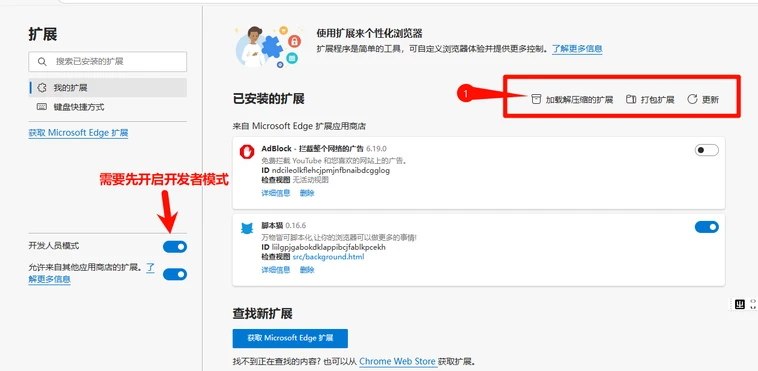
- Edge
-
- Chrome

- Chrome
④ Select the folder created in step ② (after loading is complete, the ScriptCat icon will appear in the extension list in the extension management interface, and you can also see it by clicking the extension button in the upper right corner of the browser's address bar)
-
- Edge

- Edge
-
- Chrome

- Chrome
⑤ Click the ScriptCat icon in the upper right corner, click ┆ > Get Scripts in the upper right corner of the interface that appears, and you can go to the script site to search and install scripts.
Note: Extensions installed this way cannot be automatically updated. If you need to update, please repeat the above steps to update the extension (replace files and reload once).
Get Scripts
In addition to scripts, you can also get some script information and tutorials from Tampermonkey Chinese Forum and Script Development Guide.
ScriptCat Script Site
ScriptCat Script Site is the script site for this extension, where you can publish scripts you write.
- New script site
- Background scripts/scheduled scripts
- User-friendly interface
Userscript.Zone Search
Userscript.Zone Search is a new website that allows searching for user scripts by entering appropriate URLs or domains.
- Large amount of script resources
- Easy to find suitable user scripts
- Only shows user scripts from reviewed user script pages or at least pages with comment functionality
GreasyFork
GreasyFork is a widely used platform for hosting and sharing userscripts, allowing developers to publish and users to install browser-based scripts that enhance or modify website functionality. The site was created by Jason Barnabe and is known for its emphasis on security and open-source transparency, offering a large collection of scripts to improve the browsing experience.
Jason Barnabe is also the original creator of the Stylish browser extension. However, Stylish was sold in 2016 and is now operated by a different company, with no direct involvement from Jason Barnabe in its subsequent development.
- Large amount of script resources
- Has the ability to sync scripts from Github
- Very active open source development model